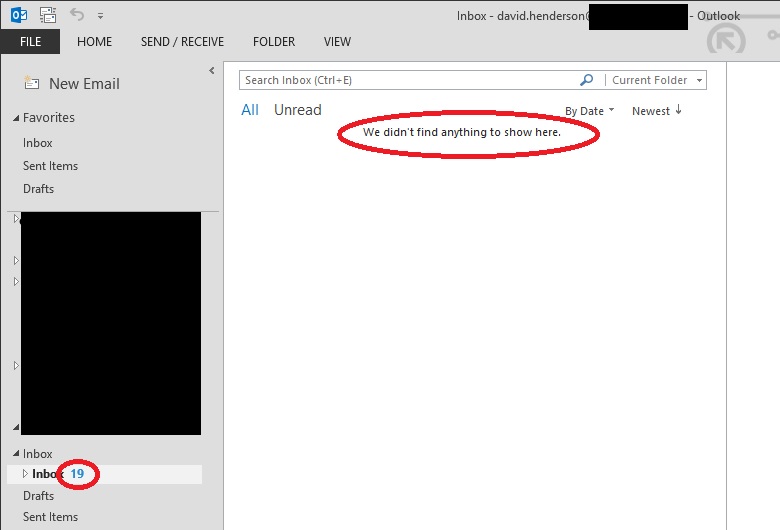
Outlook 2013 shows an empty folder where inbox displayed unread emails.

Problem:

Outlook shows the message “we didn’t find anything to show here.” when looking in a folder that shows unread items.
Screenshot of outlook 2013 showing no emails in inbox.

Cause

The views in outlook can become unresponsive causing it to not display the emails.

Solution

Reset the view in outlook
  1. Open outlook and select the folder you are having issues with.
  2. On outlook ribbon click “View”
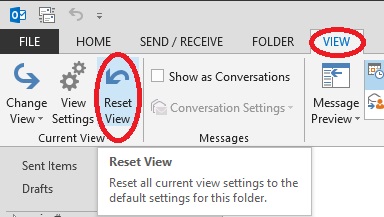
  3. Under current view category, click the Reset View
Reset views butting in the view ribbon.
Screenshot from Outlook 2013

Comments

  1. Unfortunately that didn't work for me... *sigh*

    ReplyDelete
  2. Doesn't work for me. The Reset View button is grayed out.

    ReplyDelete

Post a Comment

Popular posts from this blog

office 2013 activation error 0x80070005.

Problem: Office 2013 Activation pop up with error 0x80070005. Solution: If you are using office 2013 and it worked fine till today but now you are getting activation error message while using office applications with error code 0x80070005. Here is the solution.     a. Open Run windows(Windows key+R)     b. Browse C:\Program Files(86)\Microsoft Office 15\root\office15     c. Right click on winword.exe file.     d. Run this file as administrator.     e. Activate the Application as go with the process.     f. Close the application and reopen it. Hope this will work for you

There was a problem sending the command to the program Excel 2013 Error.

Problem: There was a problem sending the command to the program Excel 2013 Error. Solution: There could be different reasons for this error to appear in office 2013 applications after upgrading from the old office versions. Fix it: 1.Open RUN window(Windows Key + R). 2.Type Regedit and press enter key. 3. Click on file and Export a back of registry on desktop. 4. Navigate Hey_Classes_Root\Key\Excel.openspredsheet.12\shell\open\command 5. Change the key value: EXCEL.EXE /dde < to > EXCEL.EXE /e "%1". 6.Save it by pressing F5 key from keyboard. 7. Try to open your excel documents. Note: If after changing the above registry value did not resolve the issue.You can try to changing the same value for all other excel key hives in registry. You can also try doing this. 1.Click the File tab, and then click Options. 2.Click Advanced, scroll down to the General section, and then clear the Ignore other applications that use 3.Dynamic Data Exchange (DDE) check box in the General ar...

Error code 0x8007000D when trying to activate a Windows server 2008 or Windows 7 machine using any type of product key.

Error code 0x8007000D when trying to activate a Windows server 2008 or Windows 7 machine using any type of product key. Solution: Symptoms You try to activate a Windows Server 2008 or Windows 7 machine using any type of product key. Running slsmgr -dlv or slmgr -ato from a command line generates the following: The data is invalid. Error code 8007000d. Cause The System account by default has Full Control permissions to the registry path HKEY_LOCAL_MACHINE\SYSTEM\CurrentControlSet\Enum\Root and any subkeys. If those permissions have been altered for the 'Root' key or any subkey(s), we would see the error code 0x8007000D Resolution Assign the minimum permission of "Enumerate Subkeys" to the System account for the registry path HKEY_LOCAL_MACHINE\SYSTEM\CurrentControlSet\Enum\Root and any of its subkeys. To assign the permissions automatically, click the Fix this problem link.  Then click Run in the File Download dialog box, and then follow the steps in the Fix it wizar...