Outlook 2011 for Mac won’t open and closes itself.

Problem

When you open Outlook on your Mac, it opens for a brief moment and then closes. You may not see the application load up at all.

Solution

  1. Hold the alt key and click on the Outlook icon on the Dock.
    • If it is not there, go to the /Applications/Microsoft Office 2011 folder and drag the Outlook file to the Dock.
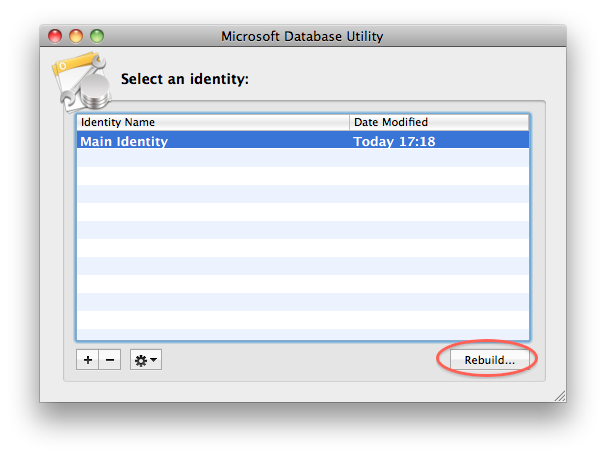
  2. The Microsoft Database Utility window will appear. Click the Rebuild button.
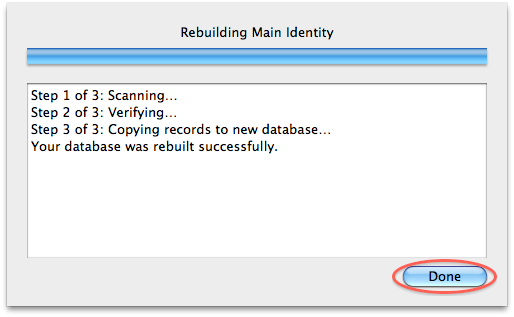
  3. It will now rebuild your Outlook database. Once it has finished, click the Done button.
  4. Close the Microsoft Database Utility.
You should now be able to open Outlook. If this does not work, then try reinstalling Office 2011.

Comments

Popular posts from this blog

Error code 0x8007000D when trying to activate a Windows server 2008 or Windows 7 machine using any type of product key.

Error code 0x8007000D when trying to activate a Windows server 2008 or Windows 7 machine using any type of product key. Solution: Symptoms You try to activate a Windows Server 2008 or Windows 7 machine using any type of product key. Running slsmgr -dlv or slmgr -ato from a command line generates the following: The data is invalid. Error code 8007000d. Cause The System account by default has Full Control permissions to the registry path HKEY_LOCAL_MACHINE\SYSTEM\CurrentControlSet\Enum\Root and any subkeys. If those permissions have been altered for the 'Root' key or any subkey(s), we would see the error code 0x8007000D Resolution Assign the minimum permission of "Enumerate Subkeys" to the System account for the registry path HKEY_LOCAL_MACHINE\SYSTEM\CurrentControlSet\Enum\Root and any of its subkeys. To assign the permissions automatically, click the Fix this problem link.  Then click Run in the File Download dialog box, and then follow the steps in the Fix it wizar...

How to change the color of the wavy underline that indicates spelling errors.?

Issue: How to change the color of the wavy underline that indicates spelling errors.? Solution: To change the color of the wavy underline that indicates spelling errors, follow these steps: 1.      Click Start , click Run , type regedit , and then click OK . 2.      Locate and then click the following registry subkey: HKEY_CURRENT_USER\Software\Microsoft\Shared Tools\Proofing Tools 3.      If the SpellingWavyUnderlineColor entry exists, go to step 6. If the SpellingWavyUnderlineColor entry does not exist, go to step 4. 4.      On the Edit menu, point to New , and then click DWORD Value . 5.      In the right pane, type SpellingWavyUnderlineColor . This is the name of the new entry. 6.      In the right pane, double-click SpellingWavyUnderlineColor . 7.      In the Edit DWORD Value dialog box, click Hexadecimal . 8.      In th...

How to Recover Deleted Mails in Outlook 2013

Issue: How to Recover Deleted Mails in Outlook 2013 Solution:  If you are using exchange account in outlook 2013 and have deleted the emails accidentally from your Inbox but you want them back into the Inbox. There is one inbuilt option on outlook 2013 that you can use to recover the emails. Please follow the steps below to remover the emails. 1. Click on folder tab from top of the outlook bar. 2. Look for recover deleted option under folder tab. 3. Select the emails from the dialog box you can select multiple by holding CTRL key. 4. Click on Restore button to recover the emails. I Hope this would fix the issue for you.